Working with ROIs
Regions of interest (ROIs) are polygonal areas which can be tested for the presence of objects or other events such as:
If an object enters or leaves a region.
The time an object stays inside a region.
The number of objects in a region.
The amount of movement or activity inside a region.
Etc.
Combined with the information from an object detector, an object tracker, or motion estimation, ROIs can provide useful insights of what is happening in a scene.
As an example Fig. 4 shows how regions are applied to a scene with a fixed camera to associate the presence of human operators or pixel activity in each region to different tasks being performed.
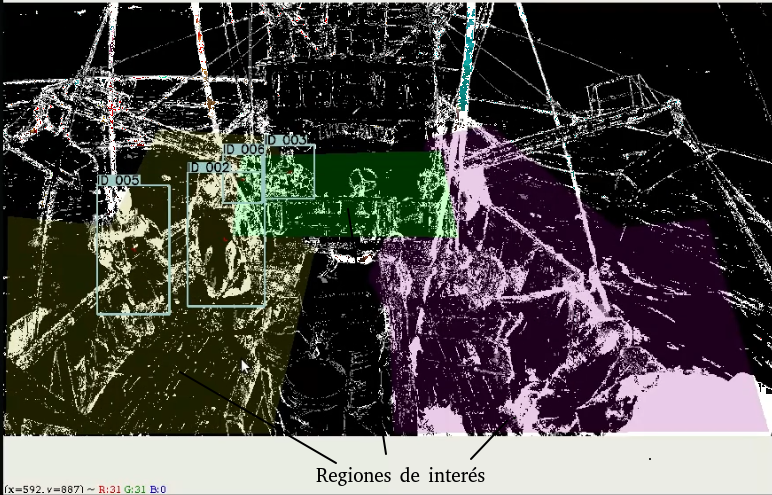
Fig. 4 Regions in the deck of a ship for classification of on board tasks in video footage.
API reference
JSON format for definition of polygonal regions
{
   "regions": [
      {
         "name": "tangon_babor_sup",
         "polygon": [[385, 315], [676, 334], [754, 625], [668, 810], [165, 757]],
         "color": [155,155,0]
      },

      {
         "name": "tangon_babor_inf",
         "polygon": [[11, 532], [777, 606], [666, 1073], [5, 1074]],
         "color": [155,155,0]
      },

      {
         "name": "tangon_estribor_sup",
         "polygon": [[1057, 336], [908, 682], [954, 773], [1522, 754], [1565, 595], [1210, 305]],
         "color": [155,0,155]
      },

      {
         "name": "tangon_estribor_inf",
         "polygon": [[973, 1072], [949, 625], [1749, 538], [1904, 1068]],
         "color": [155,0,155]
      },

      {
         "name": "puente",
         "polygon": [[1088, 369], [592, 382], [570, 580], [1131, 584]],
         "color": [0,255,0]
      }
   ]
}
This module contains components for loading and processing of polygonal regions of interest (ROIs).
- class videoanalytics.pipeline.sinks.roi.ROIPresenceCounter(name, context, filename, context_name='DETECTIONS')
Component for testing the presence of detected objects in ROIs.
This component READS the following entries in the global context:
Variable name
Description
START_FRAME
Initial frame index.
This component WRITES the following entries in the global context:
Variable name
Description
q_{name}
Number of objects inside region {name}.
- Parameters
name (str) – the component unique name.
context (dict) – The global context.
filename (str) – name of JSON file containing region definitions.
context_name (str) – name of the variable in the context containing the detections.
- (*) The entry contains a list of dictionaries containing:
polygon: numpy array containing polygon definition
color: color to represent the polygon in the video.
- process()
This method is called for each active component in the pipeline.
- setup()
This method is called after all components from the pipeline are instanced.
- shutdown()
This method is called after the process finished.
- class videoanalytics.pipeline.sinks.roi.ROIView(name, context, filename, alpha=0.2)
Component for visualization of ROIs on frame.
This component READS the following entries in the global context:
Variable name
Description
START_FRAME
Initial frame index.
This component WRITES the following entries in the global context:
Variable name
Description
regions(*)
Region definitions.
- Parameters
name (str) – the component unique name.
context (dict) – The global context.
filename (str) – name of JSON file containing region definitions.
alpha (float) – transparency factor (0=invisible,1=opaque).
- (*) The entry contains a list of dicitonaries with following elements:
polygon: numpy array containing polygon definition
color: color to represent the polygon in the video.
- process()
This method is called for each active component in the pipeline.
- setup()
This method is called after all components from the pipeline are instanced.
- shutdown()
This method is called after the process finished.